Last Updated on August 22, 2026 by Status.net Editorial Team
- End of Shift Report Examples Part 1
- Production Daily End of Shift Report Template Part 2
- Handover End of Shift Report Template Part 3
- How to Write an Effective End of Shift Report Part 4
- End of Shift Report Templates in Excel, Word, and PDF Part 5
- End of Shift Report Vs. End of Day Report Part 6
- Industry-Specific End of Shift Report Examples Part 7
End of shift report is a document that has a summary of what happened during the shift. It tells about the tasks that were completed and the ones that weren’t.
This report summarizes the tasks completed during the shift and it should detail any unfinished tasks and any new tasks which have come up. The report should be handed to the next shift and to the manager so that they are aware of what needs to be done.
The end of shift report includes information about the following:
- What was done during the shift
- What wasn’t done
- What went wrong and why
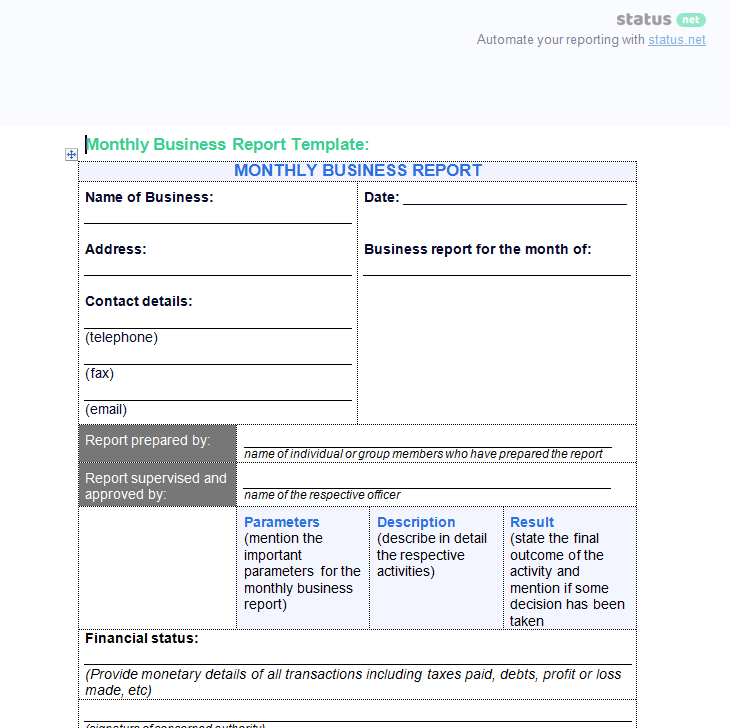
The end of shift report template is a document that is used to communicate the status of the work and any issues that have arisen during the shift. It is an important document for the next shift, supervisors, managers and other staff members to read. It helps supervisors understand what happened and if there are any changes or updates that need to be made. This report is usually generated by an employee at the end of their shift and it contains information about what was done during the shift.
Many workplaces use different names for this same document. You might hear it called a shift report, a shift log, shift notes, a passdown, or a shift handover. The terminology often depends on the industry, but the purpose stays consistent: capture what happened, flag what still needs attention, and hand that information to the next person with as little friction as possible.
A well-written end of shift report earns its value long after the shift ends. It often becomes:
- A record managers can reference if a question comes up days or weeks later
- Evidence that safety checks, maintenance tasks, or client visits were completed on schedule
- A tool for spotting patterns, like a machine that jams at the same time every afternoon, or a shift that consistently runs short-staffed
- A record that protects employees if a dispute arises about what was or was not done during their shift
In fast-paced environments like hospitals, hotels, warehouses, and production floors, the few minutes it takes to fill out this report often save hours of confusion on the next shift.
Part 1End of Shift Report Examples
Example 1:
The end of shift report template is a form that is used to provide information about the shift’s events and any problems that were encountered. The template usually contains a space for the employee to fill in their name, date, time and location. It might also have a space for them to note any issues they faced during their shift or any other information they feel is necessary.
Example 1:
- Employee:
- Date:
- Time:
- Shift: _____ AM – __ PM
- Location: ___
- Description of work completed during shift: ______, ______, ______, ______.
Example 2:
This template is a simple way to document the day’s work for a shift worker. It includes fields for the date, start and end times, issues, and any other notes about the day.
This template is not designed for shift workers who are working in an office environment where they are given a list of tasks each day. It is designed for those who work in industries where they must complete certain tasks every day.
To complete the end of shift report, fill out the following sections:
Example 2:
- Person completing report:
- Date:
- Time:
- Completed:
- Date reported to:
- Location:
- Length of shift/Actual hours worked:
- Person reporting to and their title/division (or job):
- Problem(s): brief description, severity, and follow-up:
End of Shift Report Form for Tracking Employee Hours:
In certain industries the End of Shift Report is also used to track employee hours. This type of End of Shift Report form is an essential tool for any organization that needs to track employee hours. This form is a requirement for many organizations and it needs to be filled out every time an employee clocks out.
Example 3:
Typically, this form includes the following three sections:
- The first section is the timekeeper’s signature, which certifies that the timekeeper has completed the form accurately.
- The second section includes information about when the shift began and ended, along with who was working during that period.
- The third section includes the total number of hours worked by each employee during that period.
Across industries, the exact fields on a shift report format change, but the underlying structure rarely does. Most forms move through the same three checkpoints: who was on shift and when, what got accomplished, and what still needs eyes on it. If you are building your own daily shift report from scratch, start with those three checkpoints first, then add industry-specific fields like equipment checks or client updates as needed.
A few small details make any shift report format easier to use:
- Keep the form to one page whenever possible so it gets read in full instead of skimmed
- Use checkboxes or short fill-in blanks for routine items, and reserve open text fields for anything unusual
- Date and time-stamp every entry, even ones that feel obvious in the moment
- Leave a visible space for the outgoing employee’s initials or signature, since this creates accountability for what was reported
Part 2Production Daily End of Shift Report Template
Production daily end of shift report is one of the most important documents a production manager will receive. The report should be clear and concise, with a summary of what occurred on the line during the shift. If an incident or accident occurred, this should be noted in detail in the report. If there are any changes to production processes, these should also be noted in detail.
The end of shift report can serve as a reference for future days and as a way to track progress on tasks. It is important that all errors and accidents are documented in order to prevent them from happening again in the future.
Example 4:
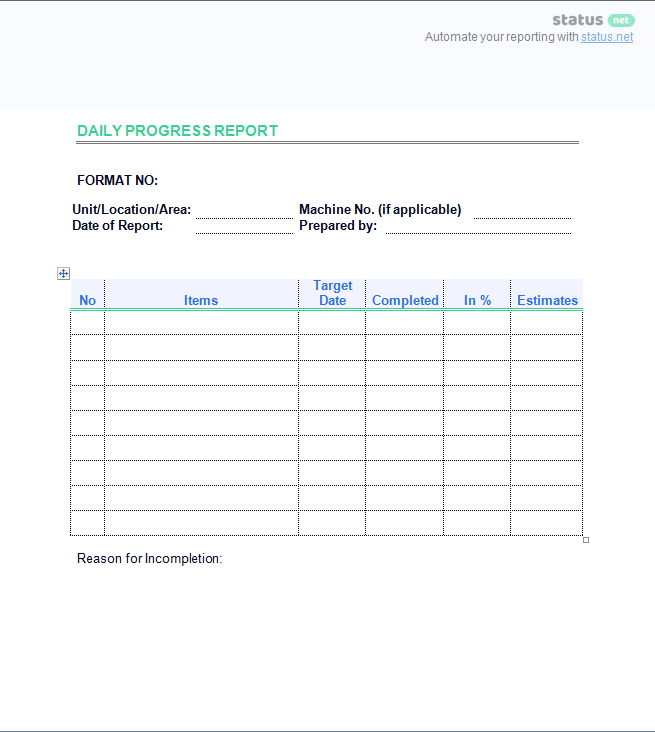
This is a daily report that is generated at the end of each shift for production. It contains information about the following:
- Number of units produced:
- Number of units delivered:
- Number of units on order:
- Estimated number of units to be produced in this shift:
- Estimated number of units to be delivered in this shift:
Example 5:
This report is a summary of the production process of the day. The report should include the following points:
- How many hours were spent on production?
- What is the total number of pieces produced?
- What is the quality of pieces produced?
- What are the defects found in production?
- What are some suggestions for improvement in production?
Key Metrics to Track in a Production Shift Report
Production environments run on numbers, so a production shift report template earns its keep when it captures the figures a plant manager needs at a glance. Beyond units produced and delivered, it often helps to track:
- Downtime, including the cause and how long the line was stopped
- Scrap or rework rate compared to the shift’s target
- Safety incidents or near-misses, even minor ones
- Staffing levels versus the planned headcount for that shift
- Equipment issues that need follow-up from maintenance
When these numbers are logged shift after shift, patterns become obvious that would otherwise take a formal audit to uncover, such as a recurring bottleneck at the same station every afternoon.
Part 3Handover End of Shift Report Template
Handover end of shift report is a daily update of the events that occurred over the day. It is a way for one shift to communicate information to the next shift about what they want them to know before they come in. The report will include any changes to procedures, problems encountered and what needs to be done before the next shift starts.
A handover end of shift report should be an effective tool for communication between shifts, improving efficiency and reducing potential errors.
Example 6:
Handover daily end of shift report template is a document that records the handover of daily duties and responsibilities from one shift team to the next. It is an important document for all employees to follow in order to maintain a safe and efficient workplace.
The template should include:
- Shift beginning time
- Shift ending time
- Who the handover was with
- What was handed over, such as responsibility for equipment, tasks, or projects
- Any other pertinent information
Example 7:
This handover end of shift report template is a document that is used to summarize the activities that took place during the day. It also contains information about the tasks that are left undone and what will be done in the next shift. This template can be used by any team who has to handover work to another team.
Fill in the following details:
- The date and time when the handover happened:
- What was handed over, including any material or equipment:
- Any outstanding tasks or issues that were encountered during this shift
Passdown Log Format for Continuous Shift Handoffs
A passdown log works a little differently from a standalone shift report. Instead of one form per shift, a passdown log, also called a pass down log or shift passdown, is often kept as a running record in a notebook, binder, or shared spreadsheet that every incoming and outgoing shift adds to over time.
This format works well in control rooms, security posts, IT operations centers, and any environment where handoffs happen around the clock and history matters as much as the most recent shift. A simple passdown log usually includes:
- Date and time of the entry
- Outgoing and incoming employee names
- Open items carried over from previous shifts, with a column to mark when each one is resolved
- New issues discovered during the shift
- A brief note confirming the incoming employee reviewed the log before starting
The advantage of a passdown log over a one-off report is continuity. Anyone can look back a week and see exactly when an issue first appeared and who has addressed it since.
Part 4How to Write an Effective End of Shift Report
Writing a strong end of shift report is less about creative writing and more about discipline. The strongest reports are written in the last ten minutes of a shift, while details are still fresh, rather than reconstructed from memory the next morning.
What to Include in Every Shift Report
Regardless of industry, a complete shift report should answer four questions clearly enough that someone with zero context could read it and know exactly what to do next:
- What happened? A short, factual summary of the shift, including any incidents, deliveries, visitors, or unusual events.
- What got finished? Tasks completed, with enough detail that no one repeats work unnecessarily.
- What is still open? Anything unfinished, delayed, or waiting on a decision, along with why.
- What needs attention first? A short list, ranked by urgency, so the next shift knows where to start.
Common Mistakes to Avoid When Writing Shift Reports
- Writing vague notes like “everything fine” instead of confirming that specific checks were completed
- Leaving the report until after clocking out, when details are already fading
- Burying the most urgent issue in the middle of a long paragraph instead of flagging it at the top
- Skipping minor incidents because they seem too small to mention, only to have them resurface later as a bigger problem
- Forgetting to note who was informed about a problem and when
Tips for Writing Faster, Clearer Shift Reports
- Keep a running note on your phone or a scratch pad throughout the shift instead of trying to recall everything at the end
- Use short, plain sentences. A shift report is a working document meant to be read quickly, not a formal write-up
- Lead with anything urgent or safety-related, then move to routine updates
- If your workplace allows it, take a quick photo of equipment issues or damage and reference it in the report
- Read your report once before submitting it and ask whether a stranger could understand it without asking follow-up questions
Part 5End of Shift Report Templates in Excel, Word, and PDF
The format you choose for a shift report template often matters as much as the content inside it. Excel, Word, and PDF each solve a different problem, and picking the right one depends on how your team works and what happens to the report after it is submitted.
Building an End of Shift Report Template in Excel
An end of shift report template in Excel works well when a team needs to track numbers across many shifts, such as production counts, hours worked, or maintenance logs. Excel also makes it easy to filter past entries or spot trends over a month.
A simple Excel layout usually includes columns for:
- Date and shift (morning, afternoon, night)
- Employee name
- Tasks completed, with a checkbox or drop-down for status
- Issues encountered, in a free-text column
- A running total row for hours, units, or incidents, calculated automatically
Locking the header row and using data validation drop-downs for status fields keeps a daily end of shift report template in Excel consistent, even when different employees fill it out each day.
Building an End of Shift Report Template in Word
An end of shift report template in Word tends to work better when the report reads more like a narrative than a spreadsheet, such as a handover note for a supervisor or a summary meant to be printed and signed. Word also makes it simple to add a company letterhead, formatted signature lines, and clearly labeled sections.
A shift report template in Word typically includes labeled fields such as:
- Employee name, shift, date, and location, usually placed in a simple table at the top
- A short paragraph field for summarizing the shift
- A bulleted list for outstanding tasks
- A signature line for the outgoing employee, and sometimes for the incoming employee as well
Choosing Between Excel, Word, and PDF
If your team needs to run calculations, compare shifts over time, or track numeric data, Excel is often the better starting point. If the report is more descriptive and needs to look polished for a manager or client, Word tends to fit better. Once a report is finalized and needs to be shared without edits, such as for an official file or an audit trail, converting it to PDF keeps the formatting intact and prevents accidental changes.
Many teams end up using a hybrid approach: an Excel template for daily entries, exported to PDF at the end of the week for archiving.
Part 6End of Shift Report Vs. End of Day Report
These two terms overlap, but they are not always the same document. An end of shift report is tied to a specific work shift and gets handed off to whoever works next, even if that is later the same day. An end of day report is tied to the calendar day itself, and it often exists even in businesses that only run one shift, like a retail store, a sales team, or a small office.
A business development end of day report, for example, usually has little to do with shift handoffs. It typically summarizes:
- Calls or meetings completed that day
- New leads generated or deals moved forward
- Revenue or pipeline changes
- Follow-up tasks planned for the next business day
If your workplace runs multiple shifts around the clock, an end of shift report is the right document. If your team works a single daily schedule and simply needs a wrap-up before logging off, an end of day report format is often the simpler fit.
Part 7Industry-Specific End of Shift Report Examples
The core structure of a shift report stays consistent across industries, but the details that matter most shift depending on the setting. The examples below reflect how different fields adapt the same basic form.
Hotel Shift Report and Handover Templates
A hotel shift report template usually centers on guest experience and occupancy, since the front desk, housekeeping, and night audit teams all depend on accurate handoffs. A hotel shift handover template often includes:
- Occupancy numbers, arrivals, and departures expected for the next shift
- VIP guests or special requests that need follow-up
- Maintenance issues reported in rooms or common areas
- Cash drawer or till balance for front desk shifts
- Any guest complaints and how they were resolved
Healthcare and Nursing Change of Shift Reports
In healthcare settings, a change of shift report often takes the form of structured shift notes or a progress note tied to each patient. Because accuracy directly affects patient safety, these reports tend to be more detailed than reports in other industries. A nursing shift report or progress note typically covers:
- Patient status changes since the last shift, including vitals and any concerns
- Medications administered and any that are due during the next shift
- Physician orders that need to be followed up on
- Family communications or care plan updates
Facilities sometimes use a bedside handoff in addition to written shift notes, where the outgoing and incoming staff review the report together before the outgoing employee leaves. This adds a verbal check on top of the written progress note and catches details that are easy to miss on paper.
Security, Supervisor, and Residential Care Shift Reports
A residential manager shift report or community shift report form template often focuses on resident wellbeing, incidents, and visitor logs rather than production numbers. Common fields include:
- Resident or client check-ins and any concerns noted
- Incidents, accidents, or behavioral notes that need follow-up
- Visitors signed in or out during the shift
- Building or safety checks completed
A supervisor end of shift report usually adds a layer above individual staff reports, summarizing overall staffing, any escalations, and whether all individual shift reports for the day were submitted and reviewed.
Restaurant, Retail, and Hospitality Shift Reports
In restaurants and retail settings, a shift report often doubles as a financial reconciliation tool alongside a task summary. These reports commonly track:
- Sales totals and cash drawer counts compared to the register
- Inventory or stock issues, such as items running low
- Customer complaints and how they were handled
- Cleaning or closing checklist items completed before the next shift opens
Frequently Asked Questions
What should be included in an end of shift report?
A complete end of shift report should note who worked the shift, what tasks were completed, what remains unfinished, and any incidents or issues that came up. Most workplaces also want a clear indication of what the next shift needs to prioritize first.
How do you write a daily end of shift report?
Write it near the end of the shift, while details are fresh. Start with anything urgent, then summarize completed tasks, list open items, and note who needs to be informed about anything unresolved. Keeping notes throughout the shift, rather than trying to recall everything at once, makes the report faster to write and more accurate.
What is the difference between a shift report and a passdown log?
A shift report is typically a standalone form filled out once per shift. A passdown log is a continuous running record, often kept in a shared notebook or spreadsheet, where open items get carried forward and marked resolved over multiple shifts. Environments with round-the-clock handoffs, like control rooms or security posts, often prefer the passdown log format because it preserves history.
What is the difference between an end of shift report and an end of day report?
An end of shift report is tied to a specific shift and hands information to whoever works next, even within the same day. An end of day report is tied to the calendar day and is common in businesses that run a single daily schedule, such as sales or retail operations that close at the end of business hours.
Is there a free end of shift report template I can use?
Many free templates are available in Excel, Word, and PDF formats, and the examples in this article can be adapted directly. Start with a simple structure covering the employee, date, shift, tasks completed, and outstanding issues, then add fields specific to your industry.
What is a progress note and how does it relate to a shift report?
A progress note is a healthcare-specific form of shift documentation that tracks a patient’s status, treatments, and any changes since the last update. It serves the same core purpose as a shift report, keeping the next caregiver informed, but focuses specifically on clinical detail rather than general task tracking.
How long should an end of shift report be?
In most cases, shorter is better. A one-page report that clearly flags urgent items and lists completed and outstanding tasks is usually more useful than a long narrative. Reports that run several pages often get skimmed rather than read carefully, which defeats the purpose of a clear handoff.
What should a nurse include in a change of shift report?
A nursing change of shift report typically covers patient status changes, medications given and due, physician orders needing follow-up, and any family or care plan updates. Many facilities pair the written report with a verbal bedside handoff to catch details that are easy to miss on paper.
Who is responsible for filling out the end of shift report?
In most workplaces, the outgoing employee or shift lead completes the report before leaving. In healthcare and security settings, this responsibility often extends to the incoming employee as well, who reviews and signs off on the handover before starting their shift.
What is a shift passdown?
A shift passdown is the process, and often the document, used to transfer open items and important information from one shift to the next. It can take the form of a single form or a continuous log that multiple shifts add to over time.